

 Nederlands
Blog series “Technical documentation and the power of AI”
It is the talk of the day: Artificial Intelligence, also known as AI. Whether it’s at the coffee machine at work, or during dinner with the family – The rapid development of AI is what everyone is talking about. From the huge impact it already has on our lives to the undiscovered possibilities (and challenges) that lie ahead. How does this affect our work and daily life?
At Foxiz we’re full of questions and ideas. By now, AI is part of the job for our technical writers, illustrators, translators, and consultants. We would like to take you with us on our journey of discovery. The thing is, we want to tell you so much; one blog simply doesn’t suffice. That’s why we’ve written an entire series of blogs on the matter, in which we highlight the different aspects of our job, as well as the impact AI has. Follow along as we explore AI.
Nr 6: Smarter writing with AI: the power of images
In a time where information is shared faster than ever before, the power of images should not be underestimated. A well-chosen illustration can clarify complex information at a glance, especially in technical documentation. The rise of AI has made it possible to edit these images faster and easier than ever.
Whether you are creating images yourself from crude photos, screenshots, renders, etc., or receive these from the client, the process remains knowledge-intensive, labour-intensive, or both. In this blog, we describe how you can use AI to save time, strengthen explanations, monitor consistency, and really help the reader understand. Writing smarter doesn’t mean using more words, but better communication through both text and images.
Generating or editing images?
AI is very powerful, but what is the actual added value for technical writers? In practice, it rarely involves inventing something completely new. Technical illustrations should accurately match existing systems, components, or processes. At present, AI is particularly effective as a tool for improving, editing, or clarifying existing images, more so than generating them entirely from scratch.
AI generated images can serve as inspiration or a visual concept, such as when explaining abstract processes or visualising non-existent parts. But when accuracy and safety are paramount, the combination of human control and AI assistance remains the most powerful approach. In short, let AI do what it does best: accelerate, improve, and diversify while you retain control over the actual content.
Specialised AI has already been developed for many tasks, but there are a few exceptionally elaborate models for:
- quickly removing backgrounds;
- highlighting of elements/components in images;
- converting of raster images (*.jpg, *.png, *.gif, etc.) to clear vector images.
Example:

Editing and enhancing client images quickly using AI
In the “Operation” section, you must explain how a product works, but the client can only provide (relatively low-resolution) product images. What do you do? Just describe the product or create an image? Below is an example where, without prompts, part from a product image can be used to explain the screen through two AIs:
- Galaxy AI is used to cut out the control panel, which could be done manually as well.
- IMGUpscaler or Krea are used to fill in the details in combination with generative AI.


Consistently sharp images, from raster to vector with AI
Nothing is more frustrating than an image that looks perfectly fine in the editor but appears grainy or blurry in the final publication. This can detract from the professionalism and clarity of the document, particularly in the case of technical documentation, where details such as arrows, labels, and connectors are important.
AI offers a smart solution: converting raster images (like *.png or *.jpg) to crisp vector illustrations (*.svg). Where traditional tools often required manual tracing, AI models can automatically recognise shapes, lines, and text and convert them into scalable vectors.
The result?
- Illustrations that always remain razor-sharp, regardless of resolution or magnification.
- Small file size, ideal for publication as both PDF and HTML.
- Easy to edit, so that parts can be changed later with regards to colour, text, or style.

For technical writers, this means spending less time on graphic post-processing and more time on content.
From photo (raster) to line drawing (vector) in an instant
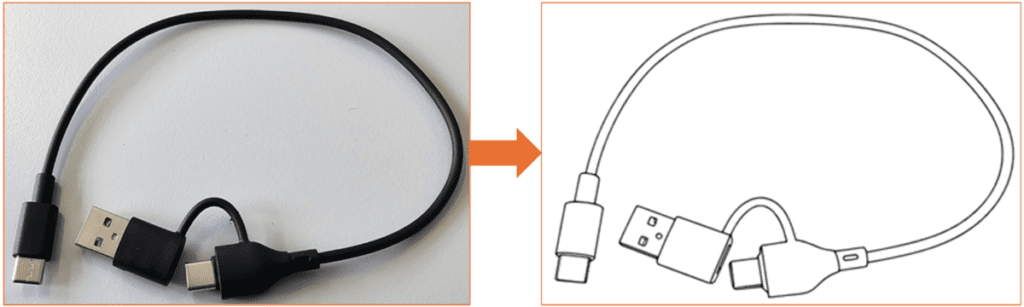
All included components are listed in a manual. Line drawings for nearly every component are available, except for the cable – the manufacturer only provided a photo. Unfortunately, this photo does not fit the style of the rest of the manual and it’s difficult to find a line drawing of this exact cable. What now?
By using specialised AI, it is possible to convert images in mere minutes without any (complicated) prompts. This can be done so quickly by breaking down the task into smaller actions and using specialised AI for:
- removing the background with Photoroom; Upload, wait for processing, and download.
- converting to line drawing with iColoring; Upload, generate, and download the image with the options Image Enhancer turned on and Remove Background turned off.
Tip: this tool is less effective at filtering backgrounds, especially if these contain shadows or noise. - converting to vector with VECTORIZATION. Upload and choose SVG as the conversion and download format.
Example:
Tip: use bookmarks in your browser. The field of AI is ever evolving, with new tools emerging daily. Experiment with different tools and create your own preference list.
Foxiz and AI
At Foxiz we implement AI in a safe, smart and effective way to aid our specialists with their work on technical documentation and translation. That’s how we create high quality technical content. Combining the best of both worlds!
In need of proper technical documentation for your product or system? Want to pick our minds on how to improve your documentation and its translation? Or are you interested in a job as technical documentalist? Please contact us! We are happy to help you.
TIP: read our last blog on AI translations . In our next and final blog of this series, we write about taking notes with AI and why that does (or doesn’t) work. To be continued!